Vendor Neutral Archiving Solutions (VNA)The solution for your healthcare data management strategy
Our solution
Optimize your organization’s data flow with the Siemens Healthineers Vendor Neutral Archiving (VNA) solution: a powerful enterprise archiving solution that centralizes interfaces, storage needs, and data management functionalities – making it the right choice for your archiving needs:
- Organize clinical results, independent of format and origin, and enable easy data sharing with proven scalable storage capacities across departments, throughout your enterprise, or regionally.
- Customize your archive to your unique clinical and technical needs with a single-archive strategy in combination with our innovative eHealth modules.
Your benefits
We support you with the right solution for better data administration, archiving and exchange.
We support the digital transformation of your healthcare organization
Data is key to improving your clinical workflows. Siemens Healthineers Vendor Neutral Archiving solution provides you with powerful, state-of-the-art and easy-to-use applications to digitalize data making it easy to view, share, store and capture relevant patient information.

Visual Care
Visual Care is a mobile application for healthcare professionals (e.g. Smartphones, Tablets) to enable seamless documentation of patients’ healing progress and fitness status.
Seamlessly document your patients’ progress and overall health status and share them with other healthcare professionals across your network. From images and photos in Wound Documentation to audio files of patient interviews and patient videos, the Visual Care app lets you securely upload information and connect it to health information systems, such as Vendor Neutral Archives (VNA) and Electronic Patient and Health Record systems.
Highlights:
- Documentation, viewing and upload of patient-related health information to connected systems
- Exchange and communication with other healthcare experts, e.g. through teleconsultations
- Improving staff efficiency and reducing documentation efforts
- Disease control and prevention capabilities
- Compliance with interoperability standards – supported media are images/photos, video/audio files (e.g. wound documentation, walk analysis after stroke, patient interviews), and free text to add notes
- Barcode scanner for quick patient retrieval
- Compliance with high security standards, e.g. no data storage on mobile devices
- Automatic data synchronization when device connects to WiFi
- Based on HL7 FHIR

syngo.share import
The syngo.share import allows you to connect with various devices, including digital cameras, scanners, and medical viewing devices (e.g. endoscopes), to select data for archiving.
Highlights:
- Archiving of data under a previously selected patient context
- Archiving can be previewed and prepared before transferred to the archive
- Various editing tools enable clean documentation
syngo.share import is also available as a standalone solution.

syngo.share print
Archive documents as PDFs using a regular Windows printer interface and print command. The Print Tool leverages the scan-to-print functionality of scanners to directly archive paper-based documents.
Assign patient, case, and study context by:
- Selecting from a DICOM Modality Worklist
- Database search of patients
- Utilizing barcode scanners
- Acquiring data from your EMR/HIS
We help you to connect patients and care teams
Engaging patients:
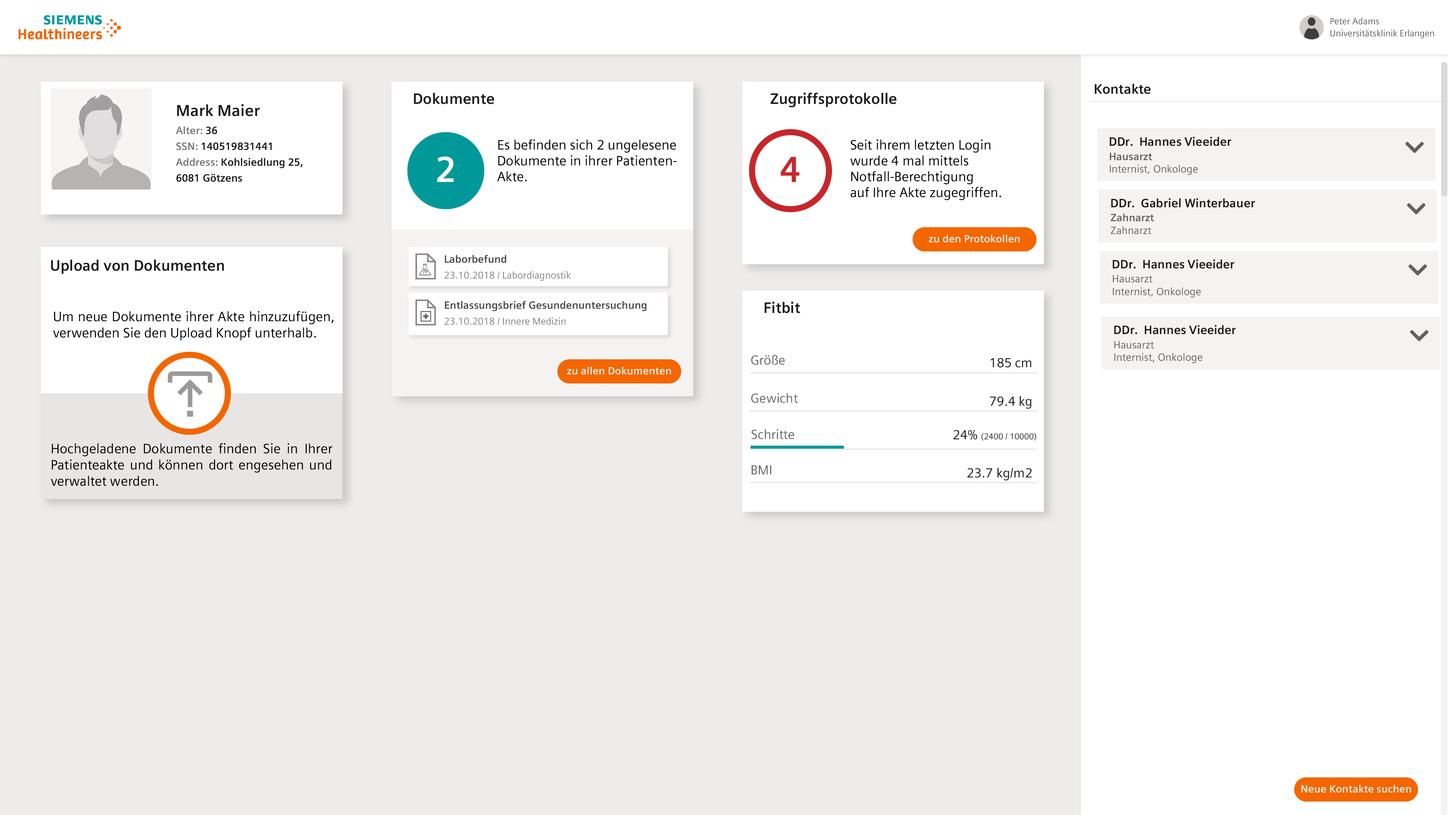
eHealth Patient Portal
eHealth Patient Portal is a web application providing patients access to their personal health data.
Empower your patients and strengthen patient-physician relationships with the eHealth Patient Portal. It lets patients access their personal health data and records, images and results. This promotes their active participation in the care process, going all paperless without having to use portable storage devices.
Highlights:
- Integrated viewer for clinical documents and images
- Downloading, editing and adding of medical information
- High security standards and multi-factor authentication provide secure access
- Easy integration of previous health data

Virtual Patient CD
Virtual Patient CD is a mobile application for patients. Differentiate your radiology department by offering your patients a state-of-the-art way of taking their clinical images home with the Virtual Patient CD. The app can be installed on mobile devices, helping you save money in the long run by replacing storage devices.
After installing the Virtual Patient CD app, patients follow three easy steps to access their images:
- Scan the QR-code provided by the radiology department to configure the app for the relevant environment
- Present staff with the unique security code issued to them by the system
- Access the images after the clinical staff assigns image codes and transmits them to the app
The application allows data exchange with connected health information systems using interoperability standards, such as IHE PIXm/PDQm/MHD, FHIR.
This application is not intended for diagnosis or treatment of medical conditions.
Giving physicians access to data:

syngo.share webview
syngo.share webview is a powerful universal zero footprint viewer. It is an ideal tool for the department-wide and enterprise-wide display and processing of various types of DICOM imaging data (including CT, CR, MRI, US, XA and WSI/SM images as well as ECG objects). In addition, syngo.share webview allows viewing and processing of multimedia data (non-DICOM data such as PDF, CDA, JPEG/PNG) and common video formats (such as MPEG, H.264) from the syngo.share VNA and other connected archives.
The web-based viewer permits fast, reciprocal access to relevant medical data (DICOM and non-DICOM data) from all departments. Optimizing clinical processes with a focus on patient security and quality of service, it may be used on various devices and virtually any place providing an internet connection.
Highlights:
- Review of clinical content through your browser
- Basic tools include:
- Zoom, layouts, resize, rotate, mirroring, windowing, magnify, flip
- Density and surface display
- Length and angle display, Cobb angle
- Manual calibration
- Free text and freehand drawing tools
- Cine loop playback of multi-frame sequences (angiograms, nuclear medicine etc.) and, if desired, slicing images (CT, MR, etc.)
- Simple switch-on and switch-off of DICOM overlays, grayscale presentation states, and annotations
- Support of barcode scanners
- Compatibility with EMR/HIS systems
- Data sharing with referring physicians and partners

eHealth Physician Portal
Our eHealth Physician Portal is a web application providing healthcare professionals, such as referring physicians or remote medical experts, access to relevant medical data that have been made available via an eHealth network.
Encourage referring physicians or remote medical experts to participate and collaborate in your patients’ treatment process to improve results. Using the web-based Physician Portal, medical professionals can access medical data made available via the eHealth network.
Highlights:
- Secure access to medical patient data (patient consent required)
- Online and offline communication with patients and referrers
- Transferrals and referrals to other healthcare providers
- Online collaboration between specialists (e.g. tumor boards)
- Second opinion and teleconsultation among medical experts
- Easy integration into existing systems
- Customizable forms for transferrals
- Secure message box for incoming and outgoing messages
- Audio, video and text communication
- Integrated zero-footprint viewer for medical documents and images, including split view
- Multifactor authentication (OTP) for secure access
- User transparency through access logging of medical patient data
Private-office physicians and health care professionals who are not connected to a primary system may also participate in the eHealth network by utilizing the Physician Portal.
Customer success stories
- Enterprise wide distribution of patient data to referring physicians through our universal viewer. Click here to see how our VNA solution helped to provide a holistic patient-centric view on all DICOM and non-DICOM data of patients in Tirol Kliniken GmbH - Innsbruck, Austria